“Every screen you build will be coloured, named, and toned by whatever you decide here. The SOUL is the thing the drift has to answer to — on Wednesday and again on Saturday.”
— Nabu, opening lecture.
The planner for AI-built software
The software planner that turns your idea into a complete, build-ready plan — so your AI coder finishes it in one pass instead of restarting for weeks.
Your AI builder asks forty-seven clarifying questions you answer on the spot, then builds the wrong app by morning. NabuKit teaches you to answer them first — in five short plain pages — so the build runs while you sleep.
Twelve chapters · one mouse learning to ship · read below.
Chapter one · The Tinker Mouse
In an attic the size of a shoebox, behind a card-table desk and a small soft laptop, a mouse kept starting software that never shipped. He had seventeen projects named my-app, each one with a half-written first page, each one abandoned by Sunday.
He’d open a fresh project on Monday. By Tuesday he had a login screen, a logo, and a feeling. By Wednesday he was redesigning the logo. By Thursday he was changing his whole approach. By Friday the whole thing was scrapped, and on Monday he opened a fresh project. Every week.
“I just need to start.” he said to the dark. But he had started seventeen times.
Lesson the first
Starting isn’t the problem. Most builders start every week. What’s missing is the bit before starting — the page where the project knows what it is.
The vibe-coding tax
The AI is patient. It will answer forty-seven of your questions in a row and build a wrong but plausible app, with perfect grammar in every last label. The symptoms come first.
No. 01
Every project starts with a brilliant first paragraph. None of them ever get a second one. You cannot ship what you cannot describe.
No. 02
You scrap the whole thing on Wednesday and start over on Thursday. The third time, you change your whole approach — usually halfway through.
No. 03
You wake at three because the first screen a new user sees is wrong. You fix it, then redo the dashboard for company. By dawn, the login is broken too.
None of these are a bad mood. They’re a budget.
Chapter two · A door that wasn’t there
The open tabs became questions, the questions became more tabs, and the tabs led, at last, to a small site Kit had never heard of: a barn library, in a meadow he’d been scrolling past for years. The page had no sign-up form. In its place sat a small grey owl, fountain pen tucked behind her ear, as if she had been there his entire life.
“Good,” she said. “You’re late. Most builders don’t arrive until project nineteen.”
The Codex of Planning
Read them once, in order, and the AI builder has every answer before it asks. Skip them, and you’ll answer the same question forty-seven times in a row, in a hurry, at 2 a.m.
Lecture room · Saturday, 8 a.m.
Nabu writes them on a chalkboard the size of a postcard, then hands the postcard to the AI.
I.
SOUL.md
Who is this for, and how does it sound?
— Voice the AI will inherit.
II.
MRD.md
What problem — in their words?
— The user’s own quotes.
III.
BRD.md
What outcomes must it produce?
— Revenue, time, tickets, shame.
IV.
PRD.md
What phases get us there?
— Each phase ends in a click.
V.
Design.md
What rules do we never break?
— Eight lines, then everything.
Reading order matters.
SOUL must be read before MRD; MRD before PRD; Design last.
Each file is short.
Most fit on a single screen. Nabu is allergic to ten-page docs.
Each ends with a refusal.
“Things we will never ship” saves you forty-seven Tuesdays.
Chapter three · The first secret
SOUL.md
SOUL.md is the first file because every other file answers to it. Before features, before flows, before a single screen is drawn — the question is who is this for, and how does it sound when it speaks? When the AI builder opens your project, this is the page it reads first.
“Every screen you build will be coloured, named, and toned by whatever you decide here. The SOUL is the thing the drift has to answer to — on Wednesday and again on Saturday.”
— Nabu, opening lecture.
Before · After
Before · Friday night, in bed
12 words, written in a Notes app.
After · Saturday, mid-morning
One file the build agent will read first, every time.
What you just learned
Twelve words from your Notes app are not yet a plan. They are a wish. NabuKit turns the wish into a page the AI cannot drift from — even at 3 a.m.
Chapter four · The second and third secrets
MRD.md
Who is this for. What problem do they hit on a Tuesday morning. What workaround are they already using. What would they rather do with that time. You do not write what you think your users need; you write what they have already told you, word-for-word, in a support message or a one-star review.
Skipping this step is the most expensive habit in software.
BRD.md
Now you sit in a different chair. What outcomes must this app produce — not features, outcomes. Revenue per user, saved minutes, fewer tickets, reduced shame. What are the constraints. What is the deadline. What you simply cannot afford to take on this quarter.
A different chair from MRD. You have to sit in both before the building begins.
A note in the margin
Whole companies have been spent on this habit.
— Nabu, on builders who skip the MRD.
Field report · one Friday with no plan
clarifying questions you’ll answer on the spot, badly.
The number isn’t a flourish. It’s the typical count of clarifying questions in one unplanned build session. Every answer becomes a wall. Every wrong answer becomes a wall you’ll have to come back and tear down.
A sample, in the order asked
Each one is answerable. None of them are answerable well, at 11 p.m., in a chat box, after dinner.
Chapter five · A confession
Logbook | Tuesday, the 17th · 02:00 — 07:00
I’ll write the SOUL tomorrow, I thought. Tonight I’ll just rough something out. By midnight I had a half-built look and feel, two competing menus, and a page I couldn’t remember adding. I had not, before this evening, considered what a brand-new user would see first. I considered it for ninety minutes.
By two I’d merged two nights of work into the wrong place. By four it all looked fine and the data underneath was wrong. By seven I was asleep on the keyboard, and the screen was open to a note that said only this is for the kind of person who— and then a long bare line where the rest of the sentence should have gone.
I woke at noon, ashamed. I closed the laptop. I went back to the planning page I’d been avoiding.
A lesson
Hours have a unit cost. So do clarifying questions answered on the spot. So do screens built at three in the morning that have to be thrown out at noon. NabuKit prices them before you spend them — in five short plain pages, read once, in order.
An interlude · Without shame
Every project you set down taught you something the next one needed. Not one of them was wasted. They were you, learning the cost of starting before you’d decided — the most expensive lesson there is, and you have already paid for it.
You don’t need more discipline. You need the deciding to happen first — once, on paper — so the next one is the one that gets finished.
Chapter six · The fourth secret
Phases, numbered. Each phase ends in something a real user can click. Tasks inside, small enough that one person (or one AI session) can own one end to end. Every task has a clear finish line — not when it feels done, but when it works.
Phase 01
Project set up; a clean, working check.
Phase 02
A user can sign up, log in, and log out.
Phase 03
First answers flow into SOUL.md.
Phase 04
All five files come from one request.
Phase 05
User downloads one file with everything.
PRD.md · page 2
The finish line is the line that says the task is done. Not by feeling. By a rule, a check, or a click that produces a known result.
# Phase 03 — Onboarding ## Tasks - [x] T-301 — Welcome screen greets the user by name. done when: the first screen shows “Hi, {{name}}”. - [x] T-302 — Profile form saves their role and goal. done when: saving moves them to the next step. - [·] T-303 — First answers flow into SOUL.md. done when: SOUL.md has a Voice section from their answers. - [ ] T-304 — Trial offer screen can be dismissed. done when: “Skip” closes it and remembers the choice.
Chapter seven · The fifth secret
Name your colors. Name your typography. Name your spacings. Then defend them, every time you are tempted to redecide the same thing eight thousand times.
— the few rules by which every other choice is made.
One source of truth
Every choice from the front door inward, made twice a day for the rest of your life.
Color One accent, used once per screen.
Type Three families, four roles, no exceptions.
Radius 6px everywhere. Never softer. Never harder.
Chapter eight · The sixth secret
Mockups travel with the SOUL, the MRD, and the PRD, all the way into the build agent’s hands. A sketch of a screen — even a wonky one with a square button and the wrong font — removes more ambiguity than ten paragraphs of prose. Drawing is teaching, faster.
Just enough that the builder can look at the picture and know what door the user opens.
Feature · Draw mode
Draw with a pencil. Annotate with a phrase. NabuKit attaches the sketch to the PRD as a working layout, so the build agent opens the project to a picture it must match.
Chapter nine · The first thing he finished
It was small. A little tool that did one thing — the thing he’d promised it would do, and nothing it had never been asked to do. He kept waiting for the part where it fell apart. The part never came.
He had answered every hard question on a quiet afternoon, before a single screen existed, while there was still time to change his mind for free. By the time he started, there was nothing left to argue about. So he didn’t argue. He just finished.
He set it down, complete, and felt the strangest thing for a Tuesday: nothing left undone.
Lesson the tenth
“Done” isn’t a feeling you wait for. It arrives on schedule when the deciding happened first — on paper, before the building.
Same screen · two stories
Before · no plan
built at · 03:14After · one bundle
built at · 06:51The whole difference
Both screens were built by the same AI, in the same hour, with the same amount of effort. One had a SOUL.md, an MRD.md, and a sketch. The other had a sentence and a hope.
Chapter eleven · The bundle
Everything the build agent needs to read before it asks a single question. Five planning pages and a working sketch of every screen — one download.
SOUL.md
Voice, principles, refusal.
MRD.md
Who. What. In their words.
BRD.md
Outcomes. Constraints. Budget.
PRD.md
Phases. Tasks. Acceptance.
Design.md
Eight lines. Then everything.
mockups/
A working sketch of every screen.
Chapter eleven · the handoff
The bundle is the folder. This short prompt is the instruction you paste alongside it — your agent reads both, then builds.
You are a senior build agent. You have a planning
bundle for <your project> with no
app built yet — your job is to build the app. Read
the files in this order:
SOUL.md →
MRD.md →
BRD.md →
PRD.md →
Design.md.
The mockups/
folder is the picture to match; each file opens directly in
a browser.
Use the tools named in
PRD.md if
any are specified; otherwise pick sensible modern ones and
note the choice in
STACK.md.
Produce a working app (not plans): every screen and page,
its setup, bin/setup,
a clean working check, and at minimum the Phase 1 finish
line met by the running app. Match
SOUL.md's
voice in every word a user sees and
Design.md's
rules precisely.
Chapter eleven · the one long quiet night
Every forty-seven question is already answered in the bundle. The build agent doesn’t need to wake you. It reads, it builds, it checks, it ships. You wake to very nearly the app you meant to ship — in the voice, palette, and rhythm you wrote down two days ago.
— logged by the build agent, while the workshop was dark.
Chapter twelve · the naming
Kit.
Like the small thing a builder carries to every job. The thing that holds all the tools, the spec, the sketch, the lesson the last project taught. The thing that is itself a plan before it becomes an app.
The name is a small joke at its own expense: a kit is the set of tools you carry to a job, and the planning bundle is exactly that — everything packed before the build begins.
— brand reveal —
The mouse and the owl, made into a tool. A school for shipping software, hidden inside a bundle.
No card during trial · cancel anytime
A look inside
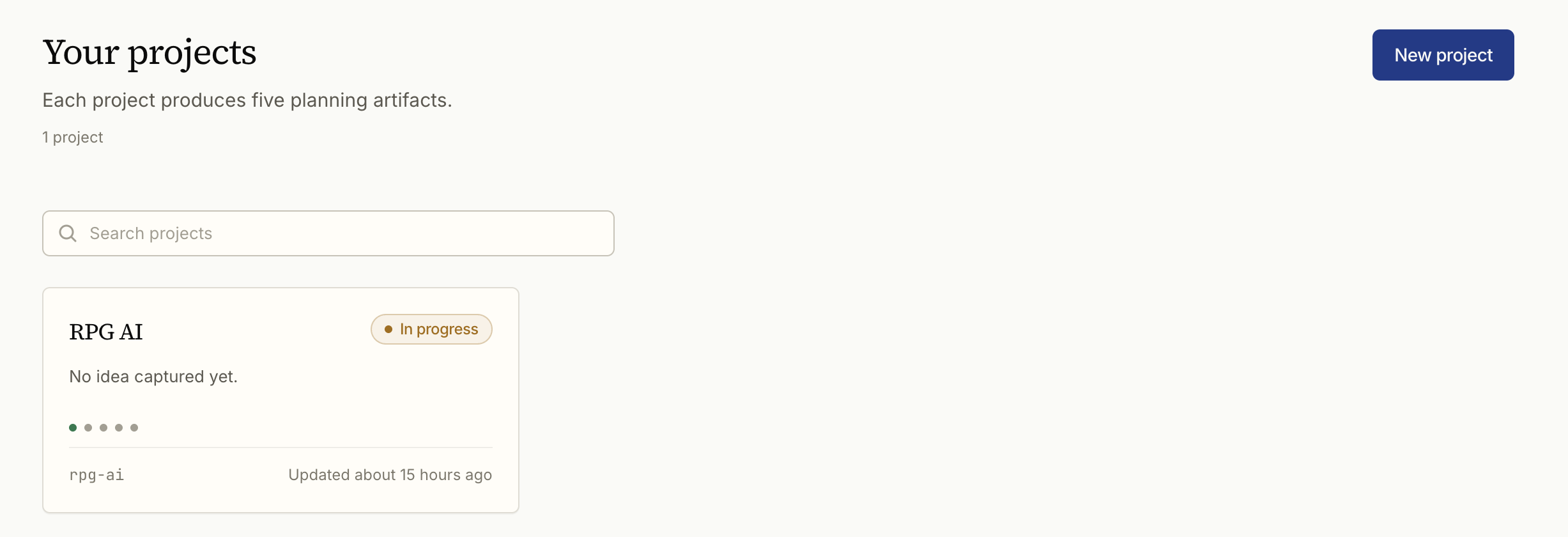
No setup, no jargon, nothing to install. You answer plain questions; NabuKit turns them into a tidy plan you can read, change, and hand off.
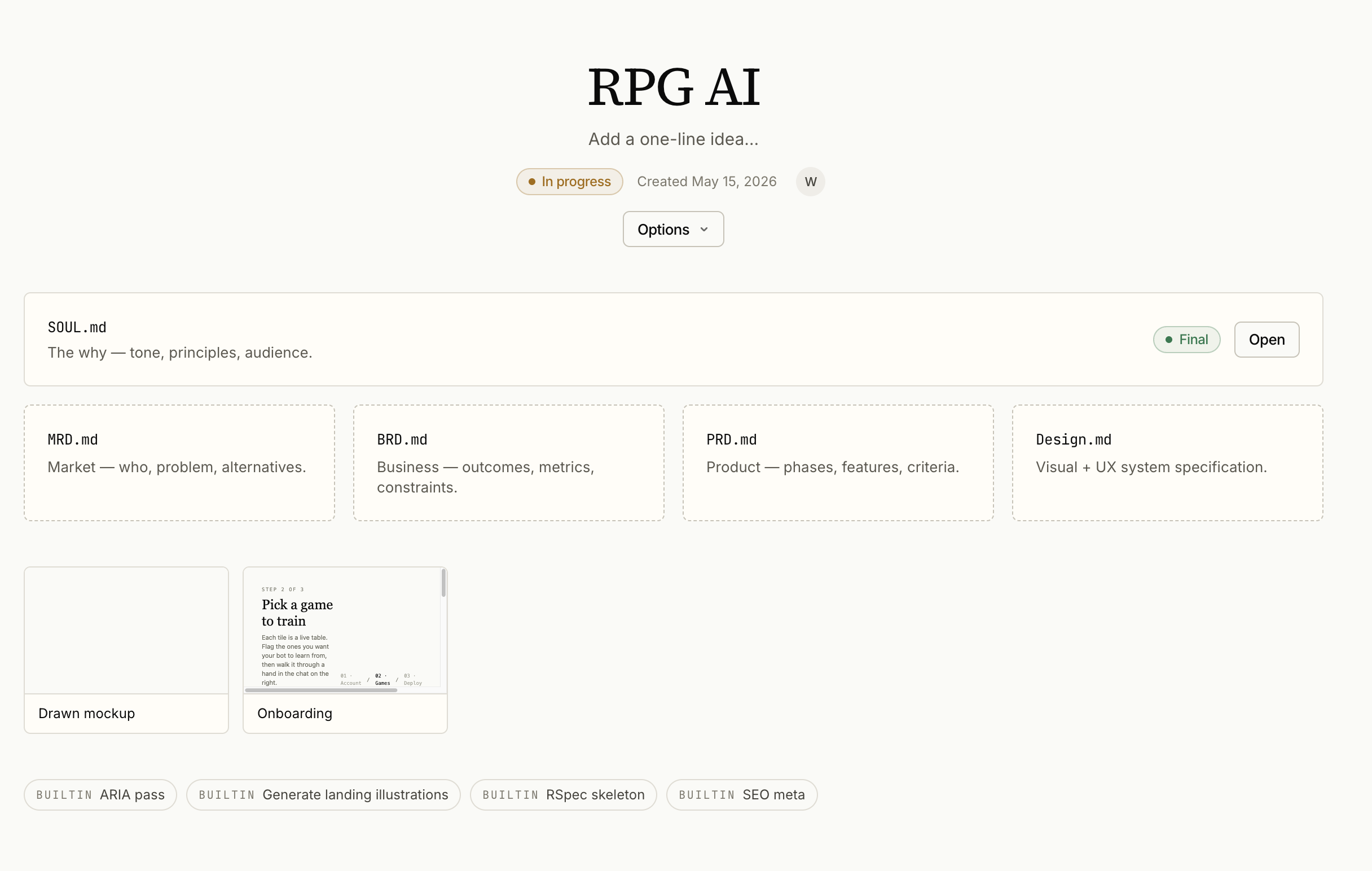
All in one place
Every plan you start lives on one shelf — pick up exactly where you left off, no hunting.
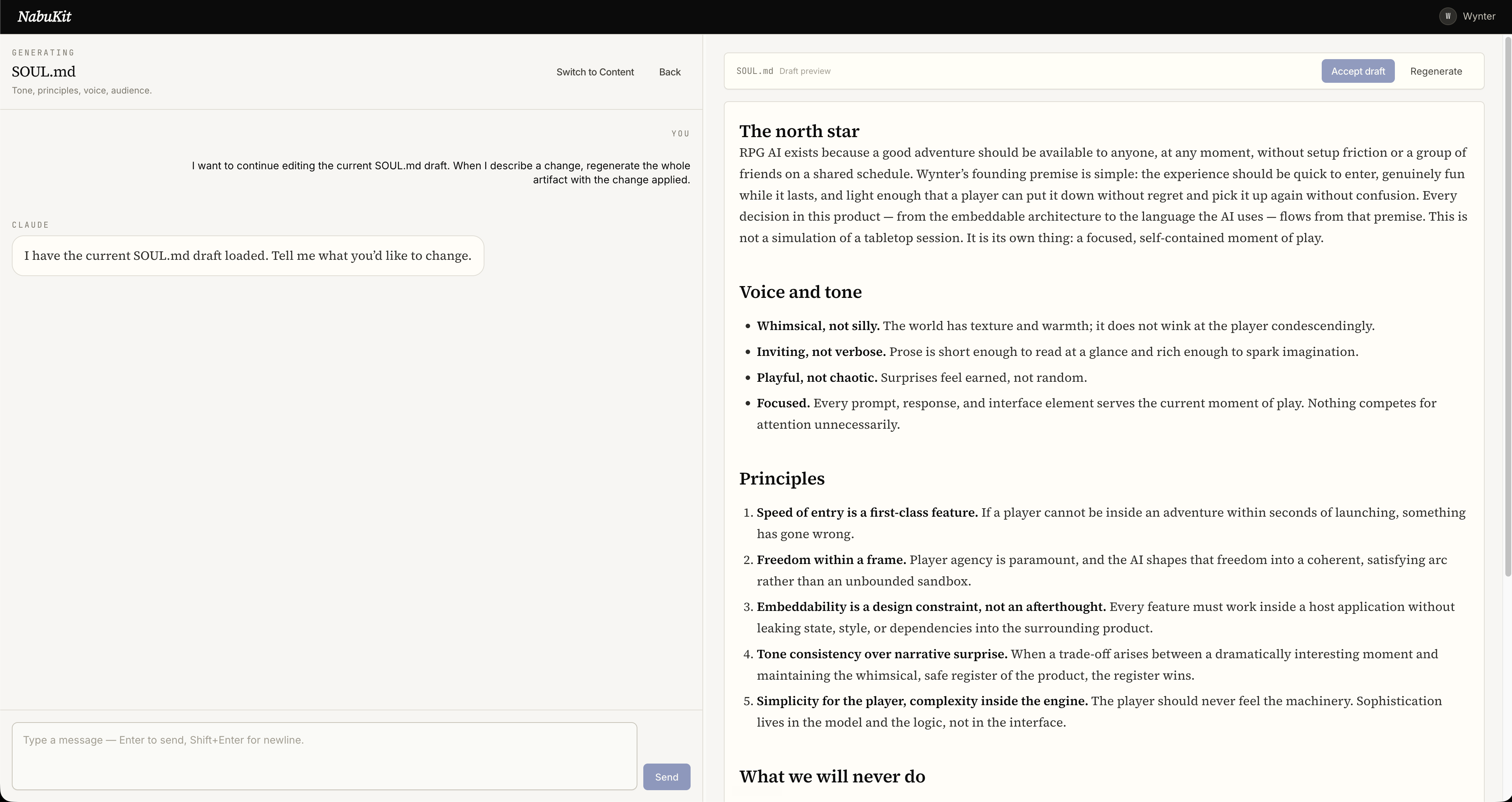
Change your mind out loud
Want it different? Say so in plain words. The plan updates and remembers — no starting over.
Decided once, kept forever
Every choice is written down a single time, so your AI builder never asks you the same thing twice.
14-day trial · no card to start
Who the school is for
my-app and a Sunday open.FAQ
Before you decide
The honest answers to the five things people quietly wonder right about here.
“I’m not technical.”
Good — you won’t write a line of code. You answer plain questions in your own words. NabuKit turns them into the plan; your AI builder does the building.
“I already have an AI that builds things.”
Then you already have the hard part. This is what you hand it so it stops guessing, stops asking forty-seven questions, and builds the thing you actually meant.
“Won’t planning just slow me down?”
Restarting is the slow part. You’ve felt it. Deciding once, up front, is the fastest route to something finished — usually by a wide margin.
“What if I don’t like what it makes?”
Change it in plain words and it remembers. And the whole trial is free to explore — if it isn’t for you, you’ll know long before you ever pay.
“Will I be locked in?”
Never. Download your plan any time and take it anywhere — it works with whatever builder you like. You can walk away clean, with everything you made.
A plain promise
Try it for fourteen days. Decide nothing today.
Full access, every feature, no card to begin. If the planning doesn’t earn its keep, cancel in one click before the trial ends and pay nothing. Either way, everything you made stays yours to keep and take with you.
No card · cancel in one click · keep your work
Pricing
NabuKit Pro
$28/ mo
14-day trial · cancel anytime
Need more usage mid-month? Top-up packs are $8 for a generous extra allowance. They stack.